
Kuku TV: Short Dramas & Series
Kuku Technologies Private LimitedEntertainment
4.0134.00 Reviews
- Version
- Varies With Device
- Installs
- 100.00M
- Age Rating
- Mature 17+
Screenshots




Our Review of Kuku TV: Short Dramas & Series
 Analysis by Appyee
I tend to judge a streaming app less by how impressive its catalogue sounds and more by whether it fits the small gaps in an ordinary day. Kuku TV: Short Dramas & Series is built around short-form scripted entertainment, so it suits viewers who want a story they can dip into on a phone rather than settle in for a long film. It is an entertainment app from Kuku Technologies Private Limited, and its focus makes the most sense when you want a quick episode during a break or a compact drama before bed.
Where a steady connection matters
Streaming is the part of the experience most shaped by your network. On a reliable Wi-Fi connection, it is easier to settle into a story without thinking about loading. On mobile data, the same viewing habit calls for a little more judgment: a short episode may fit a commute, but several in a row can turn a brief watch into a longer data session. I would treat the app as an online-first way to watch and check the current options in the app before depending on a particular connection setup.
That distinction matters if you are choosing something to watch just before leaving home. A show that starts smoothly on Wi-Fi may behave differently in a crowded station or a place with patchy reception. I find it useful to open the app and begin playback while the connection is stable, rather than assuming that a stream will carry on seamlessly after moving into a dead zone. If uninterrupted viewing is essential, a service with a clearly confirmed offline workflow may be the safer choice.
A better fit for breaks than for every screen
The short-drama format works well on a phone because it lowers the commitment needed to start a story. I can picture using it while waiting for an appointment, taking a lunch break, or winding down when I do not have time for a full-length film. The key is to treat those moments as distinct viewing slots: pick a show before the break begins, then stop when the time is up instead of letting autoplay or curiosity take over the evening.
It is less compelling if your main goal is to watch a film on a large television, follow long-form prestige series, or share a carefully planned family viewing session. Those habits are usually better served by mainstream streaming services with broad film libraries and a living-room-first experience. Kuku TV has a narrower appeal: it is for people who enjoy compact scripted stories and want them readily available on a mobile device, not a universal replacement for every streaming subscription.
Recovery when playback is interrupted
Network trouble is not always dramatic; sometimes a stream simply pauses or takes longer to resume. In that moment, I would first check whether other apps can load, then move to a stronger Wi-Fi signal or wait for mobile reception to improve. Repeatedly tapping play is rarely useful if the connection itself is the problem. If playback remains unreliable after the network is stable, restarting the app is a sensible next step before deciding that a particular episode or the whole service is at fault.
For a trip or a busy day, it is worth making the connection check part of choosing what to watch rather than discovering a problem halfway through. The app’s own current playback behavior is a better guide than a blanket assumption about how it will work everywhere. People who need guaranteed viewing in tunnels, on flights, or in areas with weak coverage should confirm the available download and playback options directly in their installed version before relying on them.
Keeping mobile-data use intentional
Short episodes can feel like small commitments, but a string of them adds up in viewing time. If you are watching away from Wi-Fi, I recommend deciding in advance whether you are stopping after one episode or staying for a longer session. That simple boundary is more dependable than opening a stream casually and realizing later that the break has turned into a binge.
Another practical habit is to browse and choose while connected to Wi-Fi, then avoid leaving a stream running when you are no longer watching. This is especially useful when you are on a limited data plan or moving between networks. I would also check the app’s playback and download controls rather than assume that a particular setting is available or enabled; streaming behavior can vary, and a quick look before a trip is better than an unpleasant surprise afterward.
First Impressions and User Interface
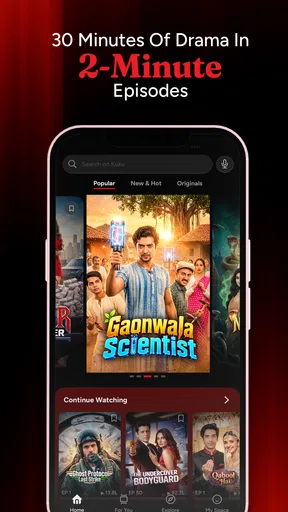
When I first downloaded Kuku TV, I was immediately drawn in by its sleek and intuitive user interface. The app’s design is clean and straightforward, making it super easy to navigate. You know that feeling when you open an app and have no idea where to start? Well, that’s definitely not the case here. Everything is laid out logically, with categories neatly organized, so you can jump right into your favorite genre.
The home screen greets you with a carousel of trending shows and fresh recommendations tailored to your viewing habits. This personalization feature is a nice touch and makes the app feel like it was designed just for you. Plus, the search bar is incredibly responsive, giving you results before you even finish typing. Talk about efficiency!
Content Variety and Quality
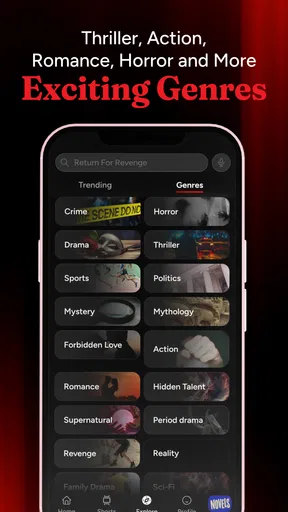
Now, onto the heart of the app—its content. Kuku TV boasts an impressive library of short dramas and series. Whether you’re into romantic comedies, thrilling mysteries, or action-packed adventures, there’s something here for everyone. Each show is categorized neatly, and you can browse through genres to find exactly what tickles your fancy.
The quality of the content is another standout feature. The production values are surprisingly high for a mobile platform, with crisp visuals and sound design that really pull you into the story. I was particularly impressed by the engaging storytelling and dynamic character development in many of the series I watched. It’s clear that a lot of love and effort have gone into crafting these narratives.
Choosing a show without losing your break
One thing I would do differently from browsing a large general-purpose streaming catalogue is arrive with a simple mood in mind. If I have ten minutes, I look for a short drama that feels easy to start; if I have more time, I explore a genre instead of endlessly scanning recommendations. That small choice helps keep the app’s abundance from becoming its own distraction. The personalized home screen can help surface possibilities, but I would still use search when I already know the kind of story I want.
For example, on a workday lunch break I might connect to office Wi-Fi, pick a series before sitting down, and watch one episode rather than browse from scratch with food getting cold. At home, I would use the same app differently: try a few options, then settle on a show if its pacing and tone work for me. The practical strength is not that every title suits every mood; it is that the short-drama format makes sampling feel less like committing an entire evening.
Features and Functionality
The app isn’t just about watching shows; it’s packed with features that enhance your viewing experience. For instance, there’s a handy download option, which means you can save episodes for offline viewing. This is a lifesaver for those long commutes or when you find yourself without Wi-Fi.
Another cool feature is the ability to create and customize your own playlist. You can queue up your favorite episodes and have them play continuously. It’s like having your own personal TV channel, tailored just for you. And if you’re someone who likes to share the love, the app allows you to share your favorite series with friends directly through social media or messaging apps.
Making a playlist work for real life
A playlist is most useful when I use it as a deliberate queue, not as a promise to watch everything in one sitting. I might line up a few episodes for a quiet evening, then stop when I reach the end of the time I set aside. That reduces the repeated decision of what to play next, while still leaving me in control of how long I watch. Sharing a series can also be a simple way to recommend a specific story to a friend, rather than trying to describe a title they may not find easily.
The download option is appealing when reception is uncertain, but I would verify that a chosen episode is actually available for offline playback before leaving a dependable network. A visible download control is not a reason to assume every title behaves identically, nor should I count on a saved episode until it is ready in the app. If you are planning a flight or a long stretch without service, test the process in advance and confirm that the episode opens as expected while disconnected.
What the audience and cost suggest
The app is free to install, which makes it easy to try without committing to a subscription at the outset. It also offers in-app purchases, with individual items ranging from about fifty cents to nearly two hundred dollars, so I would pay attention to what a purchase covers before confirming anything. The headline-free entry point is appealing, but it does not mean every viewing choice or paid item will suit every budget. I would explore the free experience first and make any purchase only when its value is clear to me.
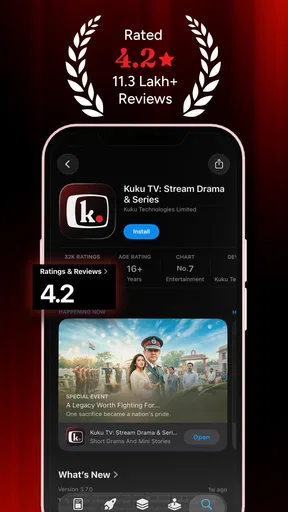
Its audience is substantial: the app has more than one hundred million installs, a four-star average from around one million ratings, and a Mature 17+ content rating. Those figures can help set expectations about reach and intended audience, but they cannot tell me whether a particular series will match my taste. I would not hand the app to a younger viewer simply because the episodes are short; the age rating is a reason for adults to check suitability and supervise access where appropriate.
Kuku TV was released on March 12, 2025, and it requires Android 7.0 or later. If I am considering it for an older phone, I would check the operating system first, then give playback a quick test on the network I expect to use most. The developer is Kuku Technologies Private Limited. These practical details matter more than popularity if my device is unsupported, my connection is unreliable, or the mature content rating does not fit the household.
Performance and Reliability
Performance-wise, I didn’t encounter any major hiccups. The shows streamed smoothly, without any annoying buffering or crashes. The app is stable and runs efficiently, even on older devices. It’s evident that the developers have put a lot of effort into optimizing the app for a seamless user experience.
Moreover, updates are rolled out regularly, ensuring that any minor bugs are quickly squashed. It’s always reassuring to see an app being actively maintained and improved, showing the developers’ commitment to delivering a top-notch service.
When another streaming choice makes more sense
I would choose Kuku TV over a broad catalogue when I specifically want a short scripted story on my phone and value quick browsing by genre. If I want a film night, a deep library of familiar international releases, or a shared television experience, a general streaming service is usually a better match. If I want background audio rather than watching a screen, a podcast or music app fits that moment better. The right alternative depends on the task: Kuku TV’s appeal is focused, and that focus is useful only when it matches what I actually want to watch.
It is also not my first choice when I cannot tolerate interruptions. Public transit can combine spotty reception, movement between networks, and limited mobile data, so I would prepare by checking the connection and any available download controls before boarding. If the app does not offer a dependable offline option for the content I want, I would choose a different activity for that journey rather than expect live streaming to behave like a locally stored video.
Who I’d recommend it to
I’d suggest trying the app if you enjoy short dramas, browse entertainment on your phone, and like having a few episodes ready for spare moments. It is particularly suited to viewers who can use Wi-Fi regularly and are comfortable choosing a show in short sessions. It is less suitable for someone seeking a children’s service, a guaranteed no-data commute, a film-focused catalogue, or a platform whose whole purpose is watching on a television. Knowing which of those needs matters most will make the decision easier than relying on a large install count alone.
If you are unsure whether the format is for you, start with a single title and notice how the episode length and storytelling rhythm feel in your own routine. Check that playback works on your usual connection, explore the app’s purchase prompts carefully, and see whether its recommendations actually help you find something. Those are more useful tests than trying to sample everything at once, especially when you are deciding whether to make it part of a regular viewing habit.
Final Thoughts
All in all, Kuku TV: Short Dramas & Series is a fantastic app for anyone looking to get their fix of quick, captivating entertainment. Its wide selection of high-quality content, coupled with its user-friendly interface and robust features, makes it a must-try for drama and series enthusiasts. Whether you’re winding down after a hectic day or just looking to escape into a different world, this app has got you covered. So why not give it a whirl? You might just find your next binge-worthy obsession!
My more measured verdict is that it works best as a specific kind of mobile entertainment, not as a replacement for every streaming service. I would keep it in mind for short breaks, explore its dramas when I have a stable connection, and be mindful of data use, mature content, and purchase choices. If those trade-offs fit your habits, it is an easy app to try; if you need guaranteed offline access, broad film selection, or viewing suited to younger audiences, another option will serve you better.
Verdict
Strengths of Kuku TV: Short Dramas & Series
- Variety of short dramas for quick entertainment.
- User-friendly interface with easy navigation.
- Offline viewing available for downloaded content.
- Regular updates with new series and episodes.
- No subscription required for basic access.
Limitations of Kuku TV: Short Dramas & Series
- Contains ads that may interrupt viewing.
- Limited content compared to major streaming apps.
- Some series are region-locked.
- Occasional buffering issues on slower connections.
- In-app purchases can add up quickly.
Other Releases by Kuku Technologies Private Limited
View All
Kuku FM: Audio Series
Music & Audio4.3
Similar Picks in This Category
View All
Google Play Games
Google LLC3.9

Netflix
Netflix, Inc.4.8

YouTube Kids
Google LLC4.2

Disney+
Disney4.4

Prime Video
Amazon Mobile LLC4.7

Steam
Valve Corporation3.2
Frequently Asked Questions
What is Kuku TV and what type of content does it offer?
Kuku TV is a streaming application that specializes in short dramas and series. It offers a wide range of genres, including romance, thriller, comedy, and more. The app aims to provide quick entertainment with episodes that are typically shorter than traditional TV shows, making it perfect for on-the-go viewing.
Is Kuku TV available for both Android and iOS devices?
Yes, Kuku TV is available for download on both Android and iOS platforms. You can find it on the Google Play Store for Android devices and the Apple App Store for iOS devices. This ensures that a wide audience can access the app regardless of their device preference.
Does Kuku TV require a subscription or is it free to use?
Kuku TV offers both free and paid subscription options. While users can access a limited selection of content for free, a premium subscription unlocks the full library of dramas and series, often without ads. This allows users to choose the level of access that best suits their viewing habits.
How often is new content added to Kuku TV?
Kuku TV regularly updates its content library with new episodes and series. This frequent addition of fresh material ensures that users have access to the latest in short-form entertainment. Subscribers can expect new releases weekly, keeping the viewing experience exciting and dynamic.
Are there parental controls available on Kuku TV?
Yes, Kuku TV includes parental controls to ensure a safe viewing experience for younger audiences. Parents can restrict access to certain types of content, allowing them to tailor the viewing options to be age-appropriate. This feature provides peace of mind for families using the app.
